Home page
By default, when you launch Yandex Browser, it opens tabs and groups from the previous session.
Open a new tab
-
Click → Settings → Interface.
-
Under Tabs and groups, disable the option Restore tabs and groups at startup.
Open a new tab alongside previous tabs
- Click → Settings → Interface.
- Under Tabs and groups, enable Restore tabs and open a new tab.
Set Yandex as the start page
- Click → Settings → Interface.
- Turn on these options:
- Restore tabs and groups at startup
- Open yandex.com if there are no saved tabs
You can pin a tab to the upper-left corner of the screen for quick access:
- Right-click the tab.
- In the context menu, select Pin tab.
Page opened in Yandex Browser
The Yandex Browser interface includes many elements. You can customize Yandex Browser for your needs by turning them on and off.
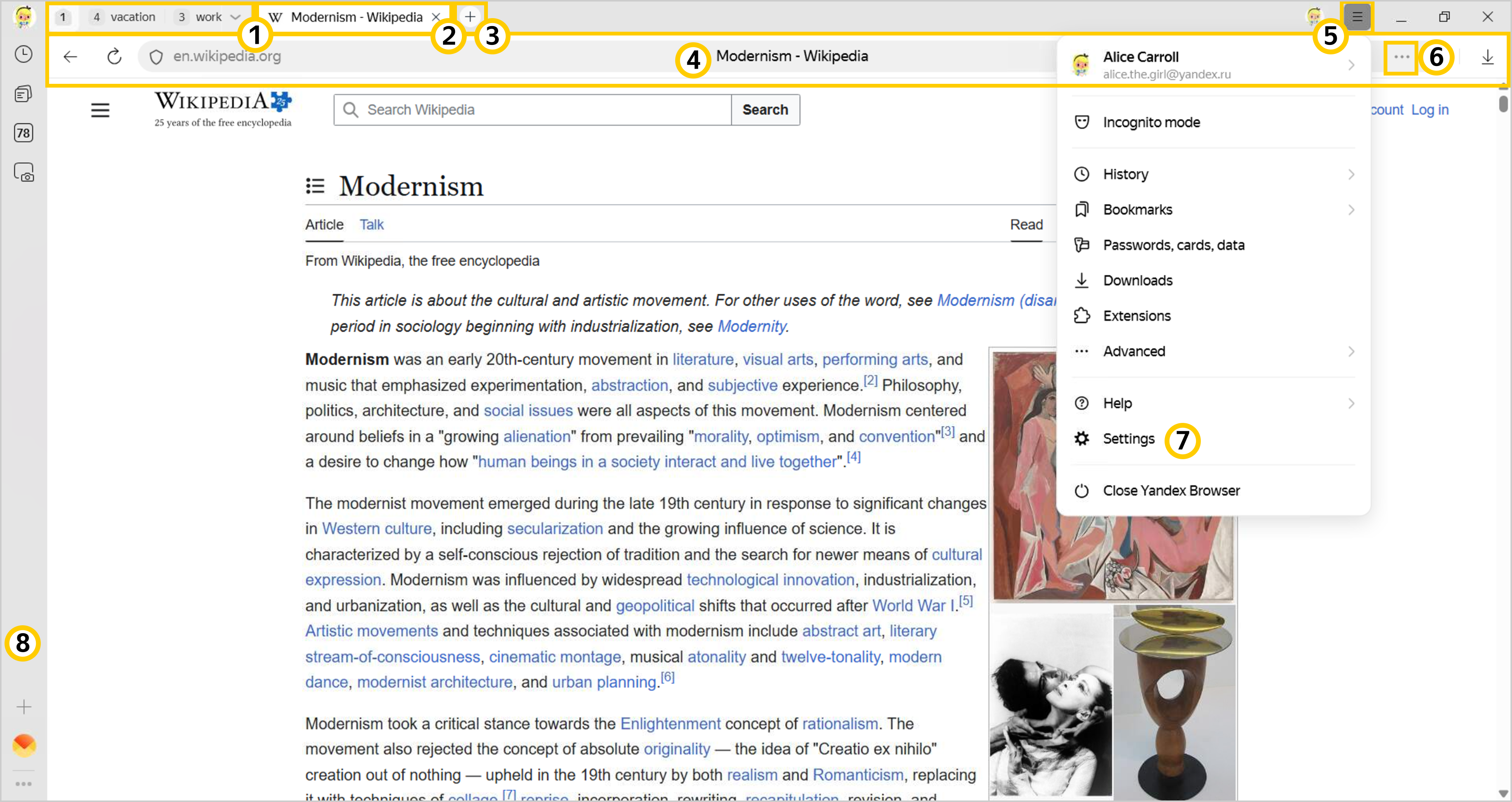
— Tabs
— New tab
— SmartBox
— Settings
To help you navigate the interface, Yandex Browser shows teaching tips. If you don't want to see them, turn them off:
-
Click → Settings → Interface.
-
Under Interface, clear the Teaching tips in the browser checkbox.
Was the article helpful?
Previous
Next